Your community's eyes on the ground.

Report potholes, water leaks, outages and crime in your area - go live from the scene, or hit SOS to broadcast your live location when you're in danger. Follow and message your neighbours, catch local news and events, browse jobs, tenders and vetted service providers, and check live load-shedding and weather for any spot in South Africa - all in one free app.

Free · Report anonymously - no account needed · Works offline · Installs like a normal app

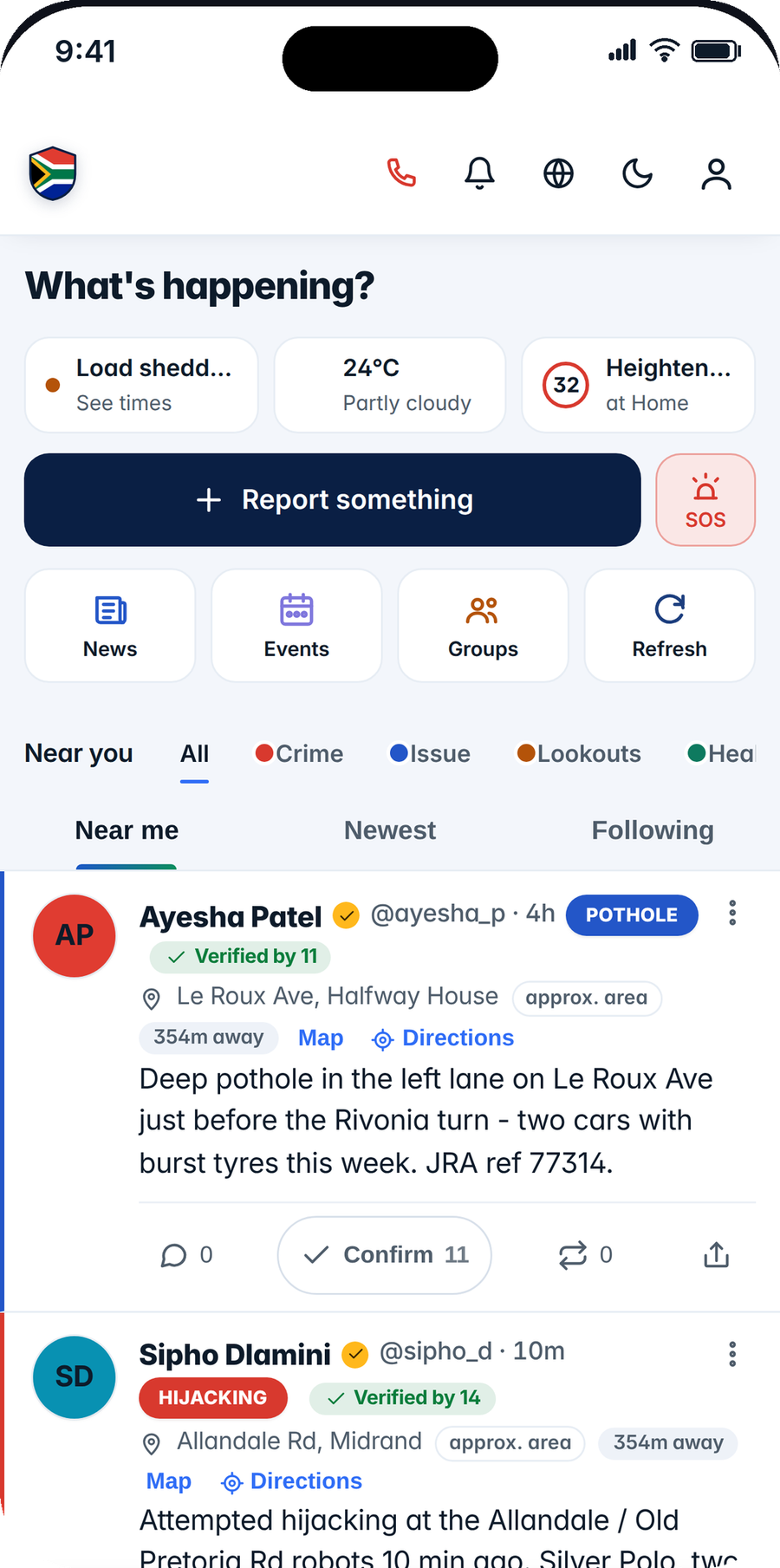
MzansiShield home showing whether your area is calm right now
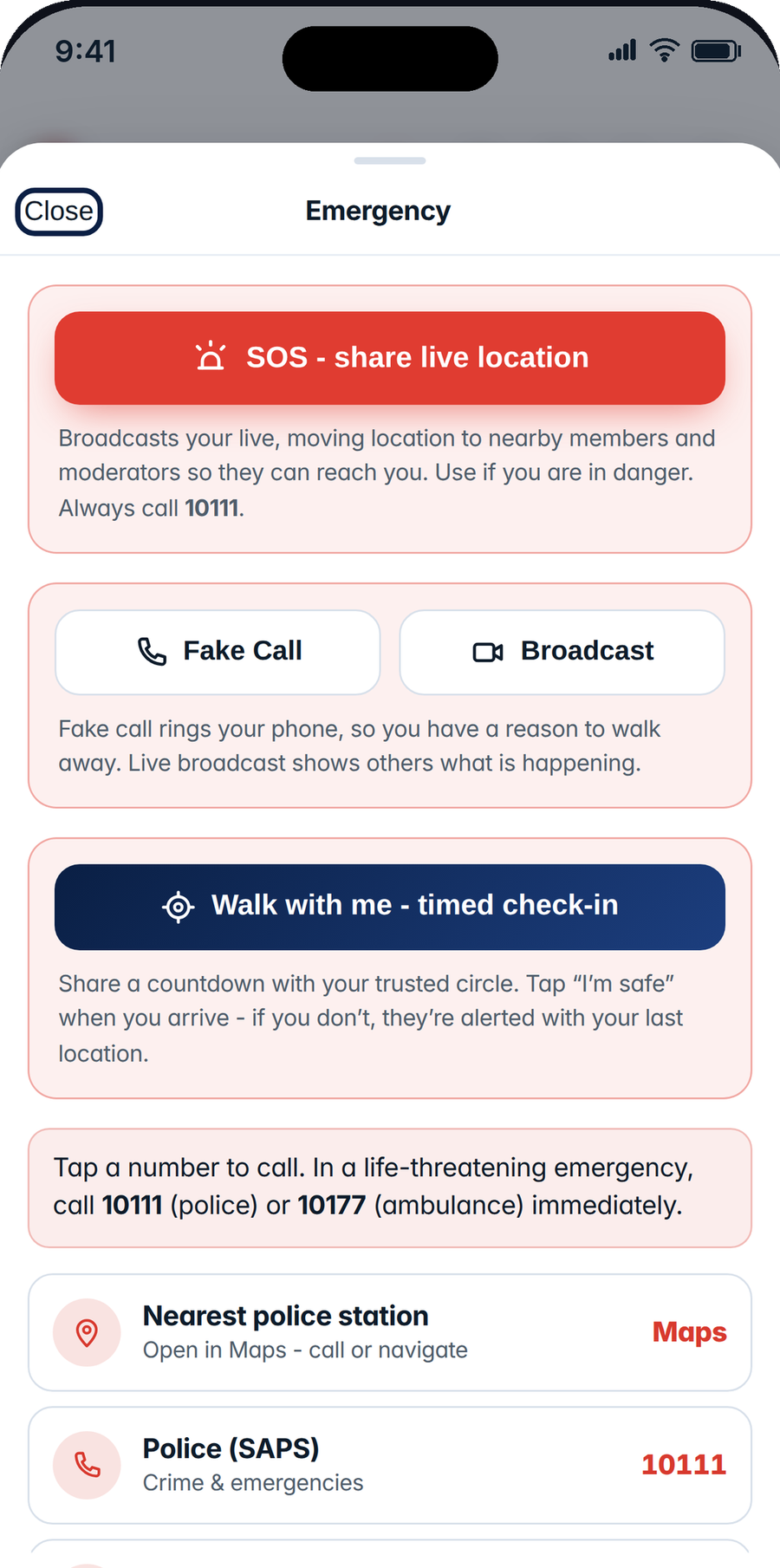
SOSlive-location emergency beacon
Liveload-shedding via EskomSePush
11 languagesall official SA languages
POPIAcompliant & privacy-first
What it does

One app for what's happening on your street

MzansiShield brings your neighbourhood's reports, alerts and utility status into a single timeline - built for South Africa.

Is your area safe right now?

Open the app and get an instant read - Quiet, Some activity or Heightened - for home, work or your kids’ school, scored from recent reports nearby. Calm by default: it flags recent activity, it never labels a place.

Check a route before you go

Heading out on foot or by car? See if your route passes any recent incidents before you leave, then start turn-by-turn in Google Maps or Waze - and share “Walk with me” in one tap.

Alerts for the places that matter

Save home, work or your children’s school - each with its own alert radius - and get warned about incidents near any of them, not only where you are standing.

Your neighbourhood watch, online

Join or start a group for your street, estate or CPF. Post to your group, see reports happening around you, and let trusted area admins keep things accurate.

Report service issues

Potholes, water leaks, broken streetlights, refuse problems and outages - pinned to the exact spot with GPS and a photo, ready to escalate to your municipality via WhatsApp.

SOS emergency beacon

Hijacked, followed or in danger? One tap broadcasts your live, moving location to nearby members, your trusted circle and the nearest registered responders - who can accept and navigate straight to you until you're safe.

Live location sharing

Share your real-time position on any report while an incident is unfolding. The pin follows you as you move, shows a pulsing LIVE badge, and ends automatically or the moment you tap Stop.

Community crime alerts

Warn your neighbours about theft, hijacking or suspicious activity in real time. Alerts show how far away they happened and who has confirmed them.

Report anonymously

No account, no sign-in needed - report an incident in seconds and it posts as "Anonymous". Your device is recorded privately for safety, never shown to anyone else.

Confirmations you can trust

Neighbours confirm what they've seen - no login required. Reports earn a "Verified by neighbours" badge, and reliable posters earn a Trusted Reporter badge, so real issues stand out from noise.

Live load & water shedding

Search any town, suburb or street in South Africa - or drop a pin - and see the live power status and nearby water outage reports, powered by EskomSePush.

Everything on a map

Explore every report near you on an interactive map. Tap a pin to read the full report, see photos and join the conversation.

Alerts even when closed

Enable notifications - even without an account - and get pushed the moment something is reported within your chosen radius, plus a daily 7am digest of what happened overnight. Works with the app closed.

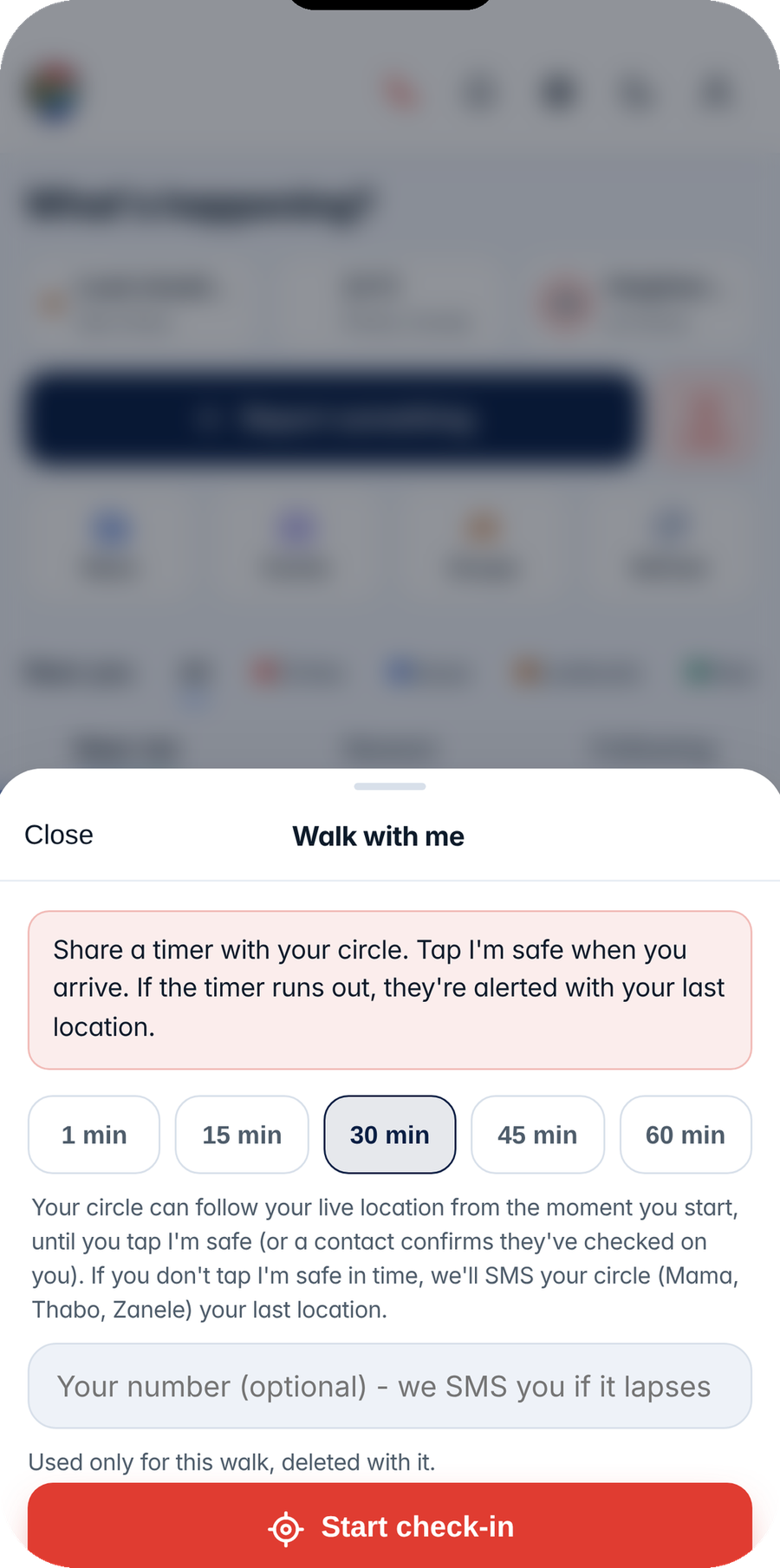
Walk with me

Walking home or to your car? Start a timed check-in and share a countdown with your trusted circle. Tap "I'm safe" when you arrive - if you don't, they're automatically alerted with your last known location.

In your language

Use MzansiShield in all 11 official South African languages - English, Afrikaans, isiZulu, isiXhosa, Sepedi, Sesotho, Setswana, siSwati, Tshivenḓa, Xitsonga and isiNdebele - with posts able to auto-translate to the language you chose.

Follow, message, repost

Follow neighbours, watch groups and official accounts for a personal Following feed. Send private messages once a follow request is accepted, repost or quote important alerts, and use #hashtags and @mentions like you're used to.

News & local events

Headlines from trusted SA sources - News24, SABC News, EWN and more - plus concerts, sport, youth rallies and community events near you, pulled from major ticketing platforms and sorted by distance.

Jobs & tenders

Vacancies from across the market, government openings and public eTenders in one place - searchable by category, from engineering and healthcare to operations and trades.

Vetted service providers

Find plumbers, electricians, security, gardening, consulting and more. Every provider passes a due-diligence review before they can list - so you know who you're dealing with.

Markets at a glance

Track major JSE-listed shares right inside the app, alongside jobs and services - one Markets tab for your working life.

Go live from the scene

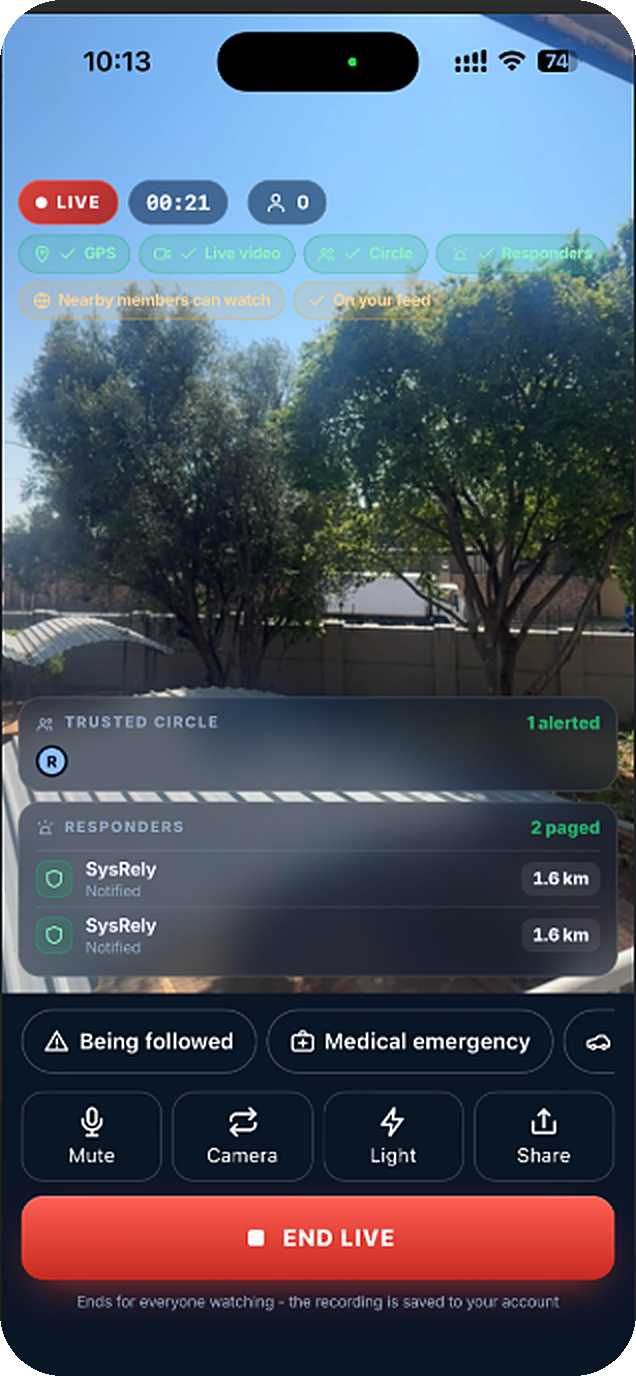
Broadcast live video from your phone when something is happening - a protest, a fire, a road blocked, a crime in progress. Neighbours watch in real time and can react; the stream falls back through several routes so it keeps going on a weak connection instead of freezing.

Roads near you

Potholes, closures and blocked routes reported by the people who drive them, searchable by street or area - so you find out before you are sitting in it.

Community health

What is going around, which clinic queues are moving, and where a medicine is actually in stock - shared by neighbours near you.

Places, checked by neighbours

Shops, taxi ranks, salons and clinics, listed and corrected by the people who use them. A place is only marked verified once several different members confirm it - not one enthusiastic owner.

Find a tutor

Say what you need help with and find someone nearby who teaches it - listed alongside jobs and services in the Markets tab.

Report anything, from anywhere

A post, a reply, a person, a private message, a live broadcast or a whole group - each has its own Report control, with reasons that include child safety. Nothing here is a surface you can be reached on but not report.

Weather, today & ahead

Your area's conditions right now plus the days ahead, side by side with live load-shedding - so one glance covers power, water and weather.

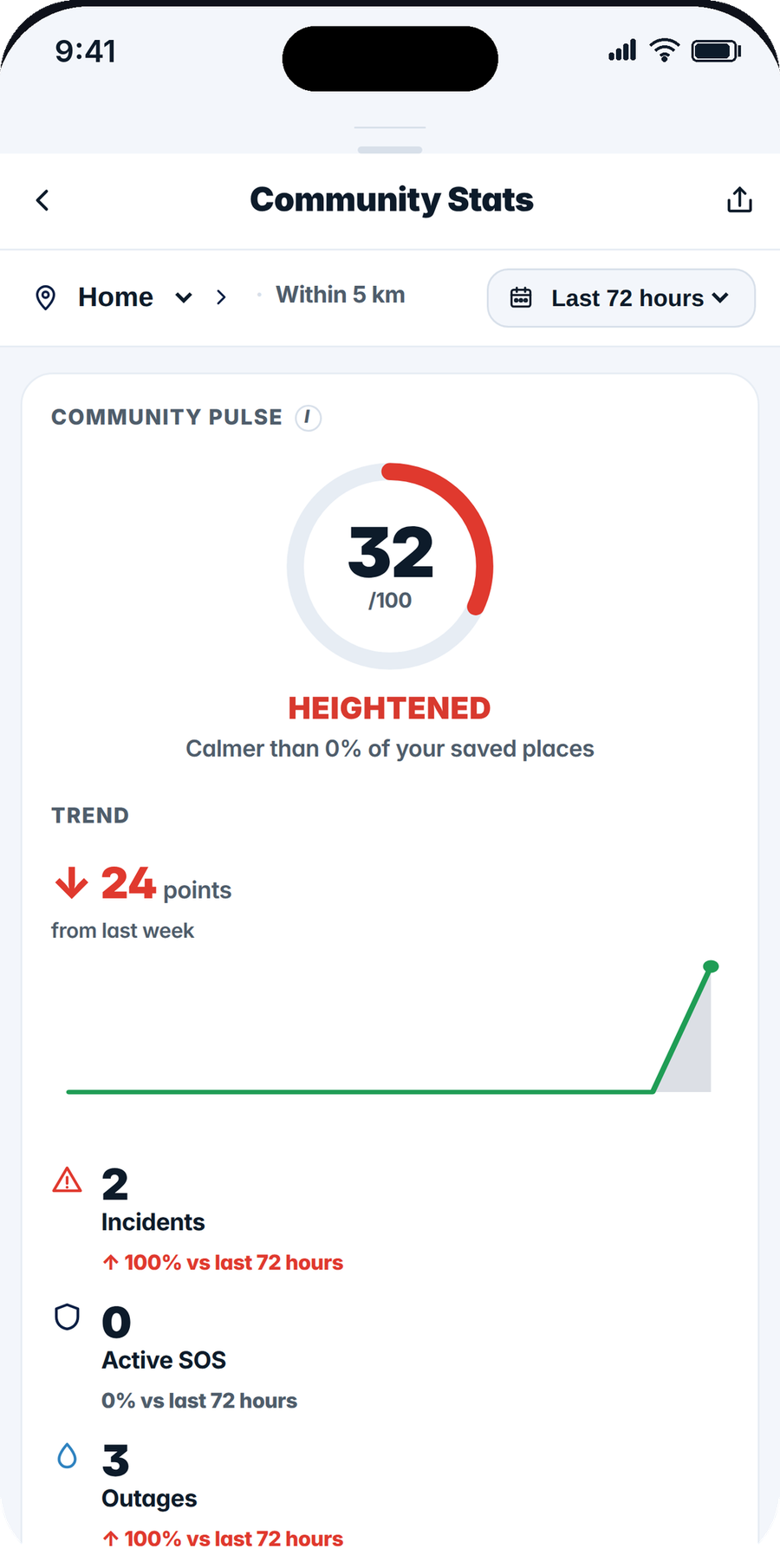
MzansiShield safety status showing whether your area is calm right now
Safety status

Is your area safe right now?

Open the app to a plain-language read for every place that matters to you - Quiet, Some activity or Heightened - scored from recent reports nearby and graded against what's normal for that area. Calm by default: it flags recent activity, it never labels a place.

  • A live read for home, work and your kids' school - each with its own radius
  • Scored by how serious, how recent, how close, and how many neighbours confirmed
  • Tap straight through to the map and the reports behind the status
  • Reassuring by design - no fear-mongering, no branding an area "dangerous"
MzansiShield checking a walking route for recent incidents before you leave
Plan ahead

Check a route before you set off.

Walking or driving somewhere? See whether your route passes any recent community reports first, then start turn-by-turn in Google Maps or Waze - MzansiShield checks the safety, your maps app does the driving.

  • Pick any start and destination; choose walking or driving
  • A clear verdict - Looks clear, Some caution or Consider avoiding - with the hotspots on your path
  • Hand off to Google Maps or Waze in one tap
  • Share "Walk with me" so your trusted circle can follow you there
MzansiShield SOS emergency beacon broadcasting a live, moving location
Emergency

In danger? Be found - wherever you are.

If you're hijacked, followed or on the run to safety, one tap on SOS broadcasts your live location to nearby members, your trusted circle and the nearest registered responders. Your pin keeps moving with you, so help is always routing to where you actually are.

  • One-tap beacon - works even without an account
  • Alerts nearby members, your trusted circle and the nearest registered responders
  • Responders can accept and navigate straight to your live pin
  • A LIVE pill stays on your screen - stop sharing any time
MzansiShield broadcasting live video from the scene, with a LIVE badge and viewers watching
Go live

Show them what is happening, as it happens.

Some things cannot be written down fast enough. From the Post button, choose Go live and stream straight from your camera - a road blocked, a fire, a protest, a crime in progress. Neighbours watch in real time and can tell you what they know.

  • Live video with a viewer count and a running timer
  • Flip the camera, mute the microphone, read what viewers are saying
  • Falls back through several delivery routes - on a weak line it drops quality instead of freezing
  • Ends the moment you tap End, and can be reported like anything else
MzansiShield community feed with follows, messages and reposts
Community

A social network, built around safety.

MzansiShield works like the networks you know - follow, message, repost - but every connection makes your street safer. Your Following feed shows what the people and groups you trust are reporting.

  • Profiles with a bio and a banner in SA flag colours
  • Follow requests you accept or decline - then private messages open up
  • Repost or quote important alerts to your followers
  • #hashtags, @mentions, trending topics and full search
  • News, events, jobs, tenders, vetted providers and JSE stocks - all inside the app
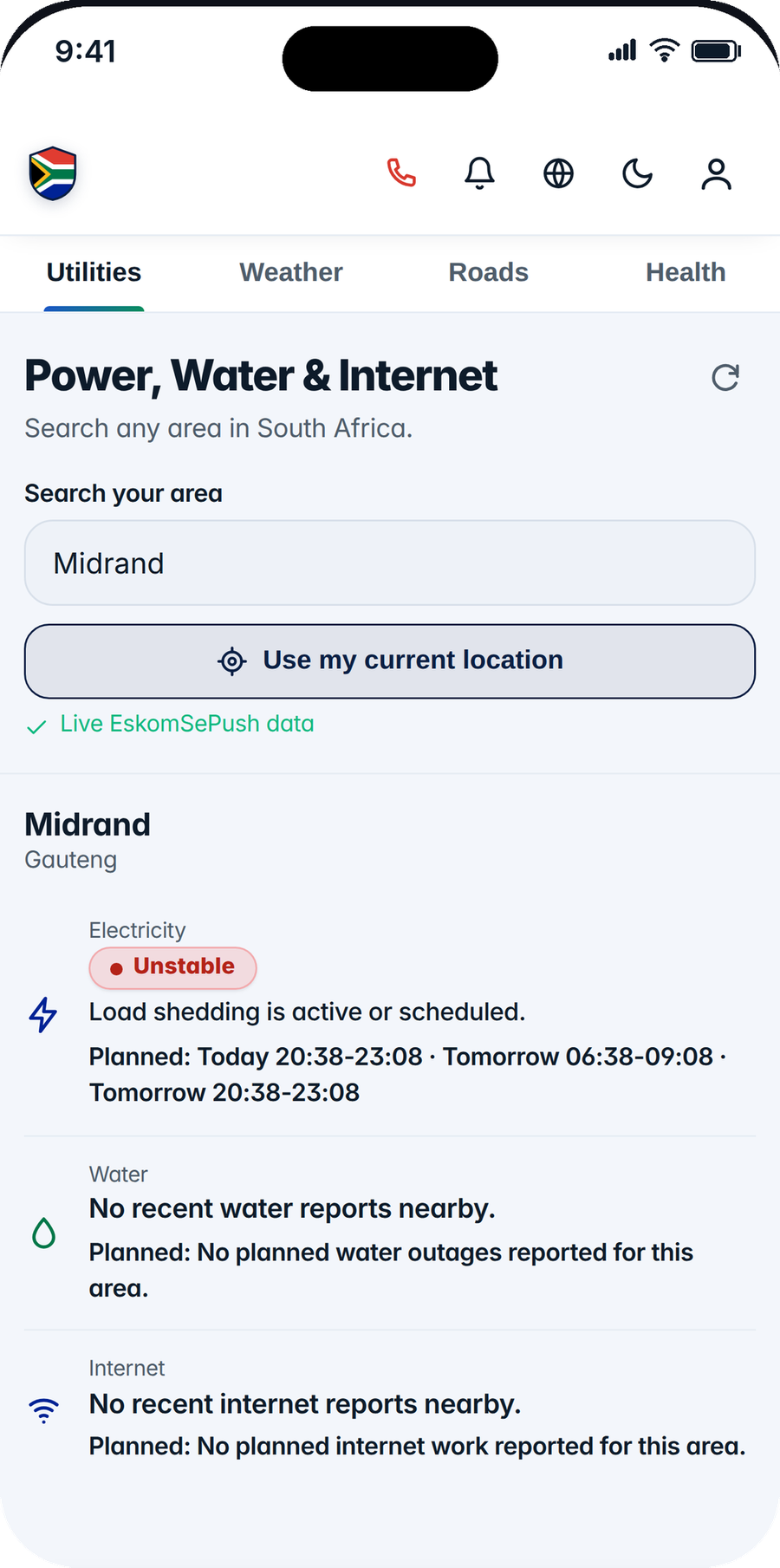
Live load-shedding status for any South African area
Utilities

Is the power on? Know before you drive home.

Check the live load-shedding status for any area in the country - your street, your mom's town, your office park. A simple Stable / Unstable answer, no schedule-decoding needed.

  • Search any town, suburb, city or street address
  • Or drag a pin on the map to check an exact spot
  • Community-reported water outages for the same area
  • A power widget on your home feed for your own location
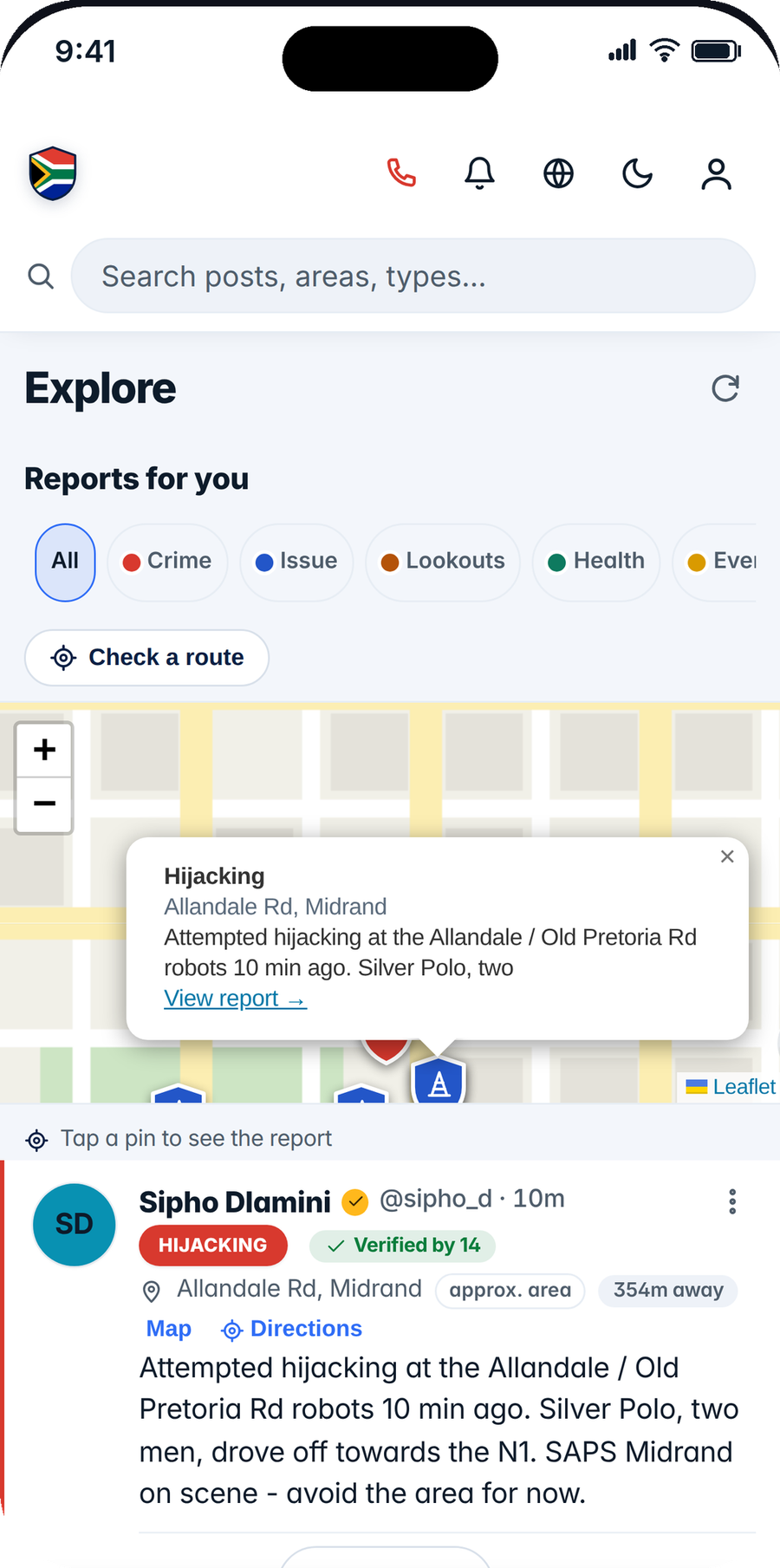
Map of community reports near you
Explore

See your neighbourhood at a glance.

Every located report appears on the Explore map - crime in red, service issues in blue. Scope your feed to your own suburb, sort by what's nearest, and search everything.

  • Interactive map of all nearby reports
  • "Near me" sorting and suburb-scoped feeds
  • Distance chips show how far each report is from you
  • Share any report straight to WhatsApp
Family safety

Look out for the people you love

From a panic-button phone for a young child to a guardian-approved account for a teenager - MzansiShield keeps families connected without ever exposing a child.

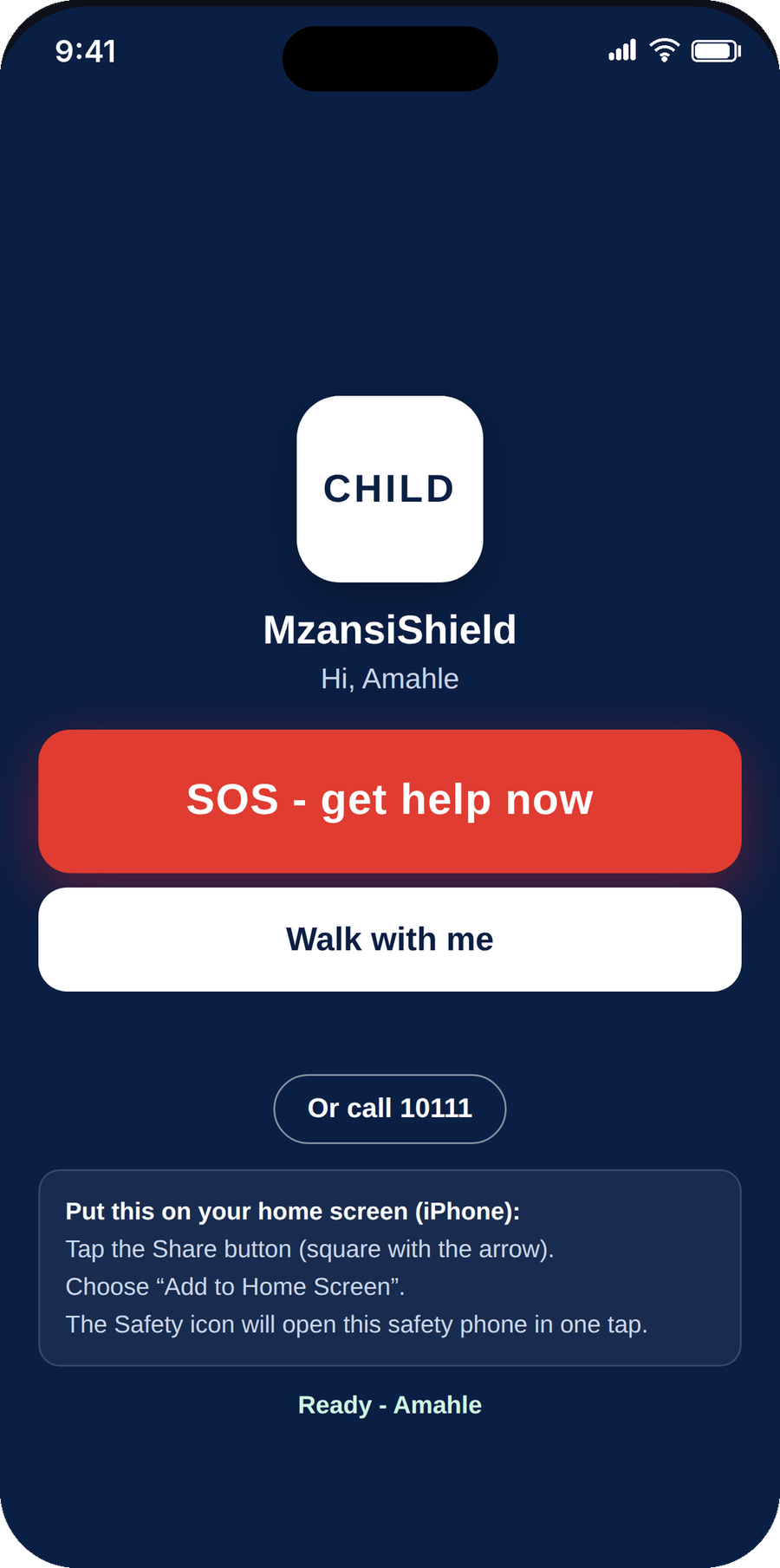
A child's MzansiShield safety phone showing just an SOS button, Walk with me and a way to call 10111
Child safety phone

A safety phone for your child - and peace of mind for you.

Turn any spare phone into a dedicated safety device. You set it up in seconds from My children with a link and a code, and it opens to just two big buttons - SOS and Walk with me. No feed, no messaging, no way out into the rest of the app.

  • Two buttons only - SOS and Walk with me - at any age
  • You're automatically their first trusted contact; add up to four more
  • Their SOS and live location reach only your circle and registered responders - never nearby strangers
  • Ask to see where they are any time - their screen always shows when you're watching, never secretly
  • Switch it off or on instantly, and grow it into a full teen account when they're ready

Walk with me, followed live

When your child starts a walk home, their live location streams to your circle - tap the alert and follow them to the door. If they don't arrive in time, you're alerted with their last known spot.

Teen accounts, a parent's say-so

13-17s get a full account only once a parent or guardian approves it - with youth-safe content, a guardian who stays on their trusted circle, and settings you control.

See they're safe - openly

Ask a managed child's phone to share its location and follow it live. It's always visible on their screen while it's on - transparent by design, never covert tracking.

How it works

Three steps to a safer street

1

Open the app - no sign-up needed

Report and confirm straight away, anonymously. Want your name on your posts and a history you can manage? Create an account with your email address and a password - we email you a 6-digit PIN once to check the address is yours. You can also continue with Microsoft or Apple. Your email is never shown publicly.

2

Report, confirm or call for help

See something? Tap +, and the app pins your exact location automatically. See someone else's report? Confirm it. In danger? Tap SOS to broadcast your live location.

3

Stay ahead

Turn on alerts and get notified of anything reported near you - even with the app closed - plus your daily area digest every morning.

Safety & privacy

Built responsibly, from day one

A community safety app carries real responsibility. MzansiShield combines automated moderation, community flagging and human review - and treats your personal information the way POPIA demands. Live location and the SOS beacon are always opt-in, time-limited, and stoppable at any moment.

Not an emergency dispatch service. The SOS beacon alerts nearby members, your trusted circle and the nearest registered responders - but a response isn't guaranteed. In an emergency always call SAPS on 10111 or medical services on 10177.
Layered moderationExplicit images are moderated and blocked, sensitive posts are held for human review, and anything the community flags is hidden pending a moderator.
POPIA compliantYour email and phone number are never shown publicly. Request a copy of your data or delete your account - and everything with it - anytime.
Children are protectedA child's SOS and live location reach only their parent, trusted circle and registered responders - never nearby strangers. Parents manage the circle, and any location check is always shown on the child's screen, never secret.
Anonymous, but accountableReport without an account and post as "Anonymous". For everyone's safety, the device is recorded privately for moderation and lawful requests - never shown publicly, and rate-limited to curb abuse.
You're in controlBlock someone and they can no longer message you, request to follow you or be notified about you - enforced on our servers, not just hidden on your screen. Report posts with one tap, and post under a display name of your choosing.
Zero toleranceContent that endangers children or targets individuals is removed, the account banned, and reported to the SAPS and the Film and Publication Board as South African law requires. Read our Child Safety Standards.
Reportable everywhereEvery surface that carries something a person wrote has its own Report control - posts, replies, profiles, private messages, live broadcasts and whole groups - with reasons that include child safety. A child-safety report reaches a human straight away rather than joining a queue.
Install

Install in seconds - no app store needed

MzansiShield is a modern web app: it installs straight from your browser, works offline, and takes a fraction of the space of a normal app.

Android

  1. Open mzansishield.sysrely.com in Chrome
  2. Tap the menu (⋮)Install app
  3. Tap Install - it's on your home screen

iPhone & iPad

  1. Open mzansishield.sysrely.com in Safari
  2. Tap ShareAdd to Home Screen
  3. Tap Add - enable alerts inside the app

Desktop

  1. Open mzansishield.sysrely.com in Chrome or Edge
  2. Click the install icon in the address bar
  3. Confirm - it opens in its own window

Prefer the app stores? They're on the way.

Native apps for iPhone, Android and Huawei are coming soon - same MzansiShield, with reliable notifications and deep links. Install from your browser today; nothing changes when the store versions land.

Download on theApp Store Soon Get it onGoogle Play Soon Explore it onAppGallery Soon
FAQ

Questions, answered

How do I know if my area is safe right now?

Your home screen shows a plain-language safety status - Quiet, Some activity or Heightened - for each place you save (home, work, your children’s school). It is scored from recent reports nearby and graded against what is normal for that area, so it flags recent activity without ever labelling a place as dangerous.

Can I check whether a route is safe before I travel?

Yes. Check-a-route lets you enter a start and destination, choose walking or driving, and see whether your path passes any recent community reports before you leave - then start turn-by-turn navigation in Google Maps or Waze.

Is MzansiShield free?

Yes - completely free to use, with no ads and no charges for reporting, alerts, SOS or load-shedding checks.

Is MzansiShield on the app stores?

The Android app is built and in closed testing ahead of its Google Play release, with an iOS build following it. Until they land you can install MzansiShield free straight from your browser - it is the same app, offline and full-screen, and everything below works today. Once the store versions are live, links you share will open directly in the installed app, and updates arrive through the store instead of the browser.

Do I need an account to report?

No. You can report incidents and confirm others' reports without signing in - they post anonymously. Create an account only if you want your display name on your posts, a history you can manage, and higher posting limits. Signing up takes an email address and a password, and we email you a 6-digit PIN once to verify the address; you can also continue with Microsoft or Apple. Your email address is never shown to anyone else.

How does the SOS beacon work?

If you're in danger, one tap broadcasts your live, moving location to nearby members within your chosen radius, your trusted circle and the nearest registered responders, and it stays live for up to a few hours or until you stop it. Responders can accept and get a "Get directions" button straight to your current position. It's not an emergency dispatch service and a response isn't guaranteed - always call 10111 as well when you can.

Can I broadcast live video?

Yes. From the Post button, choose Go live to stream from your camera while something is happening - a protest, a fire, a blocked road. Viewers nearby watch in real time. The stream automatically falls back through several delivery routes, so on a weak connection it keeps going at lower quality instead of freezing, and it ends the moment you stop it. Broadcasts can be reported like anything else.

How do I report something - or someone?

Every surface has its own Report control: the ⋯ menu on a post, the report icon on a reply, "Report this person" on a profile, "Report this conversation" in a direct message, the report control on a live broadcast, and "Report this group" on a group. Reasons include spam, false information, abuse, "Appears to be under 18" and "Child safety concern" - and the last two reach a person immediately. You can also block someone, which is enforced on our servers rather than just hidden on your screen.

How do I delete my account?

In the app: Settings → Delete profile permanently. Your profile is hidden straight away and everything is erased after 7 days - sign in before then to cancel. Already uninstalled? Email consulting@sysrely.com from the address on your account. Full details are on our account deletion page.

What is "Walk with me"?

A timed safety check-in. Start it before you walk home or to your car, and a countdown is shared with your trusted circle. Tap "I'm safe" when you arrive - if the timer runs out and you haven't, they're automatically alerted with your last known location. It's battery-aware, so it keeps working sensibly even on a low battery.

What languages does MzansiShield support?

All 11 official South African languages - English, Afrikaans, isiZulu, isiXhosa, Sepedi, Sesotho, Setswana, siSwati, Tshivenḓa, Xitsonga and isiNdebele. Choose yours in Settings, and community posts can auto-translate into it.

Who can see my live location?

Only while you choose to share it. Live location and SOS are opt-in and time-limited - a LIVE badge stays on your screen the whole time, and you can stop instantly. When sharing ends, your pin stops updating. We never track you outside a share you started.

If I report anonymously, am I truly hidden?

Your name and handle are hidden from other users - posts show "Anonymous". For community safety we privately record the device (and account, if signed in) for moderation and lawful requests only; it's never shown publicly. Replies always carry your name, so we'll warn you before you comment on your own anonymous post.

Will people see my email or phone number?

Never. Only your chosen display name appears on your posts. Your contact details are used solely for signing in, in line with POPIA.

Does it work without signal or data?

Yes - the app opens offline and shows your cached feed. Anything you post while offline is queued and syncs automatically the moment you're back online. And if you try to send an SOS with no connection, the app tells you loudly to call 10111 straight away rather than pretending your alert was sent - it never fakes an emergency.

How accurate is the load-shedding information?

Power status comes live from EskomSePush, the same source used by millions of South Africans. Water outage information is community-reported and best-effort.

Can I follow people and message them?

Yes. Follow neighbours, watch groups and official accounts to build a Following feed, and send private messages once a follow request is accepted. Profiles support a bio and a banner in South African flag colours, and important alerts can be reposted or quoted to your followers.

Where do the news, events and jobs come from?

News is pulled from trusted South African sources like News24, SABC News, EWN and Daily Maverick - each tagged with its own source colour. Events come from major ticketing platforms and community listings, sorted by what's nearest to you. Jobs combine market vacancies, government openings and public eTenders, searchable by category - and you can search events and news with everyday codewords like "amapiano", "soccer" or "tech".

How do I list my business as a service provider?

Register on the Provider Portal. Every provider goes through a due-diligence review by our team before they can list services, products or job posts - so the directory stays trustworthy.

Does MzansiShield sell my personal information?

No. Approved organisations such as municipalities and security partners can access anonymised, aggregated community-safety insights only - never names, contact details or anything that identifies you. Access is vetted, key-controlled and POPIA-aligned.

What happens when I report something false or abusive?

Posts flagged by the community are hidden automatically pending review, sensitive content is held before publishing, and accounts that break the rules are suspended. Deliberately false alerts are prohibited in our Terms.

Is this an emergency service?

No. MzansiShield shares community information but does not replace official services. In an emergency, always call SAPS on 10111 or medical services on 10177.


Contact & legal

Get in touch

Questions, safety concerns, media or partnership enquiries — or a POPIA data request. We're here to help.

Contact us

Email our team for support, feedback or partnerships.

consulting@sysrely.com

Privacy & your data

How we collect, use and protect your information under POPIA - and your rights.

Read the Privacy Policy →

Terms & Conditions

The agreement that governs your use of MzansiShield.

Read the Terms →

Child Safety Standards

Our zero-tolerance standards on child sexual abuse and exploitation, how to report a concern, and our named point of contact.

Read the standards →

Delete your account

Remove your account and everything stored with it — in the app in about thirty seconds, or by email if you have already uninstalled it.

How to delete →

Report a child-safety concern. Email consulting@sysrely.com with CHILD SAFETY in the subject, or use Report in the app — every post, reply, profile, message, broadcast and group has one. Read our Child Safety Standards. If a child is in immediate danger call 10111; Childline South Africa is 116.

Join your community's eyes on the ground

It takes 30 seconds to sign in - and your street is safer for it.